D2 Diagram Guide
This guide explains how to create D2 diagrams in the Reventless documentation, what classes are available, and the conventions to follow so every diagram looks and reads consistently.
How diagrams are rendered
D2 diagrams are embedded as fenced code blocks in any markdown file:
```d2
direction: down

cmd_topic: Command Topic { class: command-topic }
aggregate: Aggregate    { class: aggregate }

cmd_topic -> aggregate: commands
```
The Docusaurus build runs a preprocessing plugin (d2PrependStyles in
packages/doc/docusaurus.config.js) that automatically prepends the contents of
packages/doc/d2/reventless.d2 to every d2 code block before passing it to the D2
compiler. This means:
- No import line is needed in the markdown. Just write the diagram body.
- All classes defined in
reventless.d2are always available. - VS Code preview works without errors (it renders the diagram without colors, since it runs D2 directly on the raw code block, but no import resolution error occurs because there is no import to resolve).
The shared styles file lives at packages/doc/d2/reventless.d2. That is the single
source of truth for all colors, shapes, and container styles. Never put hex color
values or shape overrides directly in a diagram. Assign a class instead.
Diagram sizing on the built site
Sequence diagrams (fenced d2 blocks containing shape: sequence_diagram) are tagged
with a sequence-diagram CSS class by a rehype plugin, and src/css/custom.css caps
their rendered width (via --seq-diagram-max-width) so they don't stretch to the full
content column — and balloon — on wide screens. This cap is site CSS only: it lives
in the Docusaurus bundle and does not affect any editor preview (see below). Keep the
diagram body compact (short actor labels, terse edge labels) so it reads well before
that cap scales it down.
Previewing diagrams while authoring (VS Code)
A VS Code preview renders the raw d2 code block — it does not run the
Docusaurus pipeline. Two consequences trip people up:
- No theme colors. The shared
reventless.d2styles are prepended only at build time, so previews render uncolored (this is expected — not an error). - No site CSS. The
sequence-diagramwidth cap above lives in the site bundle, so a preview will never apply it. The built site is the source of truth for final colors and sizing; treat the editor preview as a quick structural check.
If you want a closer-to-final preview, pick an extension by how it renders:
| Extension | Renders into | Custom CSS / sizing |
|---|---|---|
| D2 in Markdown | VS Code's built-in markdown preview | Honors the standard markdown.styles setting — point it at a small local CSS file to cap width |
| Markdown Preview Enhanced | its own webview | Per-block options after the d2 fence tag (e.g. layout=elk theme=200 sketch) plus its own "Customize CSS" (style.less) |
| Terrastruct D2 | dedicated .d2-file preview | Primarily for standalone .d2 files; rendering fenced d2 blocks inside markdown preview is limited |
Gotcha — don't reuse the site selector. The sequence-diagram class is injected by
our Docusaurus rehype plugin, not by any extension. In an editor preview the diagram is
just a plain img/svg, so a local cap must target a generic selector, e.g.:
/* a local CSS file referenced from markdown.styles — NOT the site's custom.css */
.markdown-body img { max-width: 460px; height: auto; }
These are per-machine editor preferences (VS Code settings / a local CSS file under the
gitignored .vscode/), independent of the committed site CSS.
Color system — Event Storming post-it mapping
The color palette is derived from Event Storming post-it conventions so that the color of a node — and its connections — immediately communicates its DDD role.
| Color | DDD role | Node classes | Connection class |
|---|---|---|---|
| Blue | Command / Command infrastructure | command, command-topic, command-generator | command-flow |
| Yellow | Aggregate / Write-side logic | aggregate, state-change-slice | — |
| Orange | Event / Event storage | event-log, dcb-event-log, event-topic, event-collector | event-flow, replay |
| Green | Read Model / Projection | read-model, state-view-slice, query-db | projection-flow |
| Purple | Policy / Reaction / UI | event-mapper, counter, api, client | — |
| Pink | External System / Side Effect | side-effect, task, external-system | — |
| Teal | Cross-context boundary | extension-point, extension | cross-plugin |
| Gray | Scheduling / Infrastructure | scheduler, heartbeat, adapter, memory-state | — |
| Washed | Work-item status (not a component) | status-pending, status-active, status-done, status-retry, status-terminal | — |
Node classes
These are applied to individual nodes with { class: <name> }.
Commands — blue
| Class | Shape | Use for |
|---|---|---|
command | rectangle | A command message type |
command-topic | queue | The CommandTopic message queue |
command-generator | rectangle | CommandGenerator bridging API to CommandTopic |
Aggregates — yellow
| Class | Shape | Use for |
|---|---|---|
aggregate | rectangle | An Aggregate root |
state-change-slice | rectangle | A StateChangeSlice in a DCB plugin |
Events and event storage — orange
| Class | Shape | Use for |
|---|---|---|
event-log | cylinder | EventLog (per-aggregate event store) |
dcb-event-log | cylinder | DcbEventLog (shared event store across slices) |
event-topic | queue | EventTopic fan-out channel |
event-collector | rectangle | EventCollector consuming from an EventTopic |
Read models — green
| Class | Shape | Use for |
|---|---|---|
read-model | rectangle | A ReadModel projection |
state-view-slice | rectangle | A StateViewSlice in a DCB plugin |
query-db | cylinder | QueryDb (read-side storage) |
Policies and reactions — purple
| Class | Shape | Use for |
|---|---|---|
event-mapper | rectangle | EventMapper mapping events to commands |
counter | rectangle | Counter for deduplication or metrics |
api | rectangle | GraphQL API / AppSync endpoint |
client | rectangle | GraphQL client / browser / external caller |
External systems and side effects — pink
| Class | Shape | Use for |
|---|---|---|
side-effect | rectangle | SideEffectHandler |
task | rectangle | Task (escape-hatch for side effects) |
external-system | rectangle | External third-party system (dashed border) |
Cross-context boundary — teal
| Class | Shape | Use for |
|---|---|---|
extension-point | hexagon | ExtensionPoint exposing a plugin's interface |
extension | rectangle | Extension consuming a remote ExtensionPoint |
Scheduling and infrastructure — gray
| Class | Shape | Use for |
|---|---|---|
scheduler | rectangle | Scheduler for time-based command publishing |
heartbeat | rectangle | Heartbeat for periodic health signals |
adapter | rectangle | Adapter interface or adapter implementation node |
memory-state | rectangle, dashed | In-process state a component holds between steps — not a provisioned store. Dashed because it does not survive the process. |
Work-item statuses — washed
For state machines whose nodes are statuses rather than components — a TODO
item's lifecycle, say. Reach for these instead of borrowing a component class:
a box labelled Completed styled read-model claims the status is a read
model, and picks up a colour that means something else in every other diagram.
They are deliberately paler than the component classes so a status diagram does
not read as a diagram of components.
| Class | Shape | Use for |
|---|---|---|
status-pending | rectangle | Waiting, not yet picked up |
status-active | rectangle, bold | In flight right now |
status-done | rectangle | Finished successfully |
status-retry | rectangle | Failed, but a later sweep will try again |
status-terminal | rectangle, dashed | Failed for good — no sweep picks it up. Dashed because the flow stops here. |
Leave the transitions between them unclassed: command-flow / event-flow /
projection-flow name message kinds, and a state transition is not a message.
Container classes
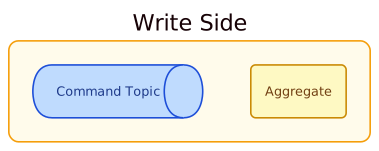
Containers group related nodes. Apply a container class alongside direction:
| Class | Color | Use for |
|---|---|---|
write-side | amber | Write-side area (CommandTopic → Aggregate → EventLog) |
read-side | green | Read-side area (EventCollector → ReadModel → QueryDb) |
side-effects-area | pink | Side effects group (collector → handler → task) |
event-processing-area | purple | Event processing group (collector → mapper → counter) |
plugin-area | teal | Plugin System (ExtensionPoint + Extensions) |
extension-point-area | cyan | Group of ExtensionPoints exposed by a plugin |
scheduling-area | stone | Scheduling group (Heartbeat + Scheduler) |
adapter-area | gray | Adapter interfaces or adapter implementation group |
reventless-area | light blue | Reventless core framework package group |
reventless-aws-area | blue | Reventless AWS adapter package group |
slices-area | yellow | Group of StateChangeSlices inside a write side |
view-slices-area | green | Group of StateViewSlices inside a read side |
query-dbs-area | green | Group of QueryDbs inside a read side |
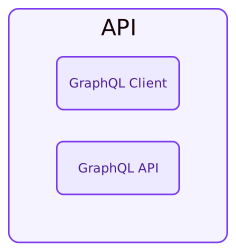
api-area | purple | API + Client group |
Layout helpers
| Class | Use for |
|---|---|
placeholder | Invisible grid cell used as a spacer in grid layouts |
Connection classes
Connections carry semantic meaning through their label and their color. Apply a
connection class the same way as a node class — with { class: <name> } at the end of
the edge declaration. Both the arrow line and the label text take the class color.
Semantic flow classes
| Class | Color | Use for |
|---|---|---|
event-flow | orange | Any edge that carries domain events — from event log to topic, topic to collector, collector to handler |
command-flow | blue | Any edge that carries commands — from client/API to command topic, from mapper to command topic |
projection-flow | green | Edges that write projected state — from read model / view slice to query DB |
Structural modifier classes
These encode a structural characteristic (dashed line) in addition to a color.
| Class | Color | Style | Use for |
|---|---|---|---|
replay | orange | dashed (3) | Event log replaying past events back into an aggregate or slice to reconstruct state |
cross-plugin | teal | dashed (4) | Any edge that crosses a plugin boundary — extension commands back to an extension point, or extension point commands into a foreign command topic |
When to leave a connection unclassed
Not every edge needs a class. Leave the connection plain (no class) when the edge is infrastructural or doesn't carry a domain-meaningful payload:
api -> query_db: queries— a read query with no color identityhandler -> task: trigger— an internal side-effect invocationhandler -> external: calls— an outbound call to a third-party system
Never add style.stroke or style.font-color directly to a connection. Use a
class or leave it unclassed.
Layout patterns
Simple diagrams — direction: down or direction: right
For diagrams with a clear linear or hierarchical flow, set direction at the top level
and let D2's default layout engine (dagre) arrange everything. Containers size to their
content naturally.

Complex diagrams — ELK grid layout
Use a grid when the diagram has multiple independent areas that need to stay spatially separated (e.g., the DCB overview with write side, read side, plugin system, and scheduling all coexisting).
Rules:
- Set
vars: { d2-config: { layout-engine: elk } }at the top. - Wrap everything in a transparent root container with
grid-rowsandgrid-columns. - Define items in reading order (left-to-right, then top-to-bottom) — D2 fills the grid by the order items are declared, not by their key names.
- Use
{ class: placeholder }for empty grid cells, not{ style.opacity: 0 }. - Keep the grid at most 3 × 3 at the top level.
- Note that grid cells always stretch to fill their allocated cell. If a container is significantly smaller than its neighbors, consider whether a non-grid layout is more appropriate, or place the container's nodes directly as grid cells.
Walkthrough: Aggregate-Based Plugin diagram
This is the simpler of the two overview diagrams. It uses D2's default layout
engine with direction: down at the top level.
Structure:
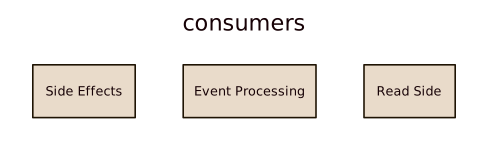
clientandapiare top-level nodes, not inside any container.write_sidegroups the command/event infrastructure (direction: rightso components flow left to right).consumersis a transparent wrapper (no class — juststyle.fill: "transparent") grouping three sub-areas:side_effects,event_processing, andread_side.pluginsandschedulingare independent top-level containers.- Edges at the bottom connect the top-level containers to each other.
Key pattern — transparent wrapper container:
When you need to group sub-areas for layout purposes without a visible border, skip the class and set transparency directly:
Walkthrough: DCB-Based Plugin diagram
This diagram has more areas that need controlled placement, so it uses an ELK grid.
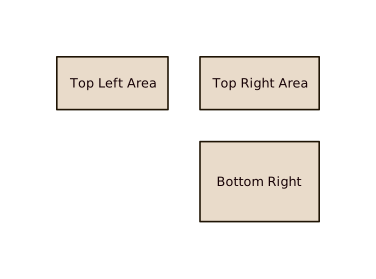
Grid layout (3 × 3):
Row 1:  placeholder  │  scheduling      │  placeholder
Row 2:  plugins      │  write_side      │  graphql (API + Client)
Row 3:  placeholder  │  read_side       │  (empty)
Items are declared in that exact order inside dcb_layout so D2 fills the grid
correctly. The # ── Row N ── comments mark the boundaries.
Key pattern — nested grid inside a grid cell:
The graphql container uses grid-rows: 2 so client and api stack vertically within
their single grid cell. This is fine for two nodes but note that the cell will stretch
to match the height of the tallest cell in that row.
Cross-cell edges:
Edges between nodes in different grid cells are declared at the bottom of dcb_layout,
after all the cell definitions. Reference nested nodes with dot notation:
Where the classes are defined
Every class used above lives in packages/doc/d2/reventless.d2, which the docs
build prepends to each diagram automatically — there is no import line to write.
Read that file for the full list; never write a raw colour into a diagram, since
a hand-picked hex is exactly what stops one page's diagram matching the next.